Users may occasionally report that the horizontal scrollbar is missing when viewing gradebook pages, such as:
- View/Manage Class Grades (class-level grades)
- View Grades (spreadsheet) (assignment-level grades)
This issue is most commonly reported in Mozilla Firefox, though it may occur in other browsers depending on system settings. It is less commonly seen in Google Chrome or Microsoft Edge.
The issue is typically caused by a Windows accessibility setting that hides scrollbars.
Resolution
Windows 11
- Open Settings
- Select Accessibility
- Select Visual effects
- Turn on:
- Always show scrollbars
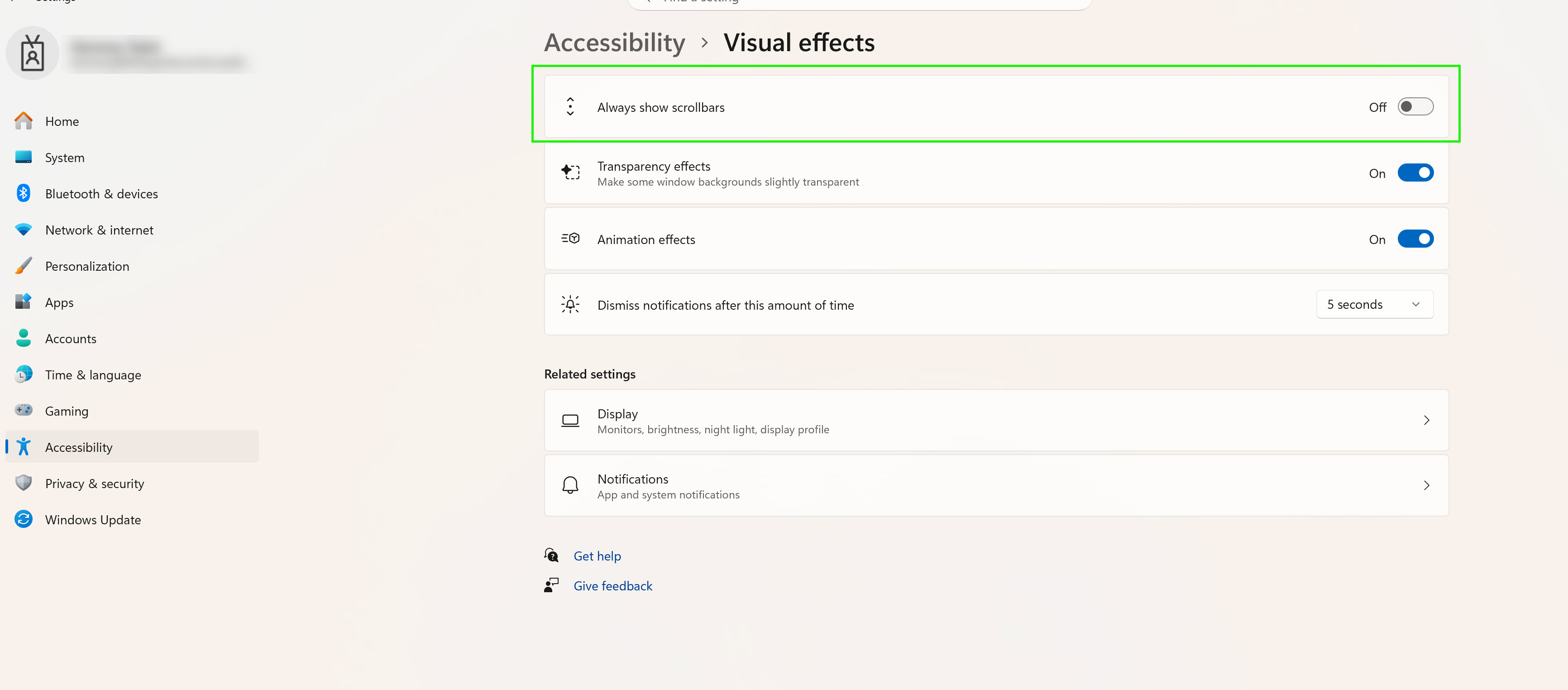
- Always show scrollbars
After enabling this setting:
- Return to the gradebook page
- Refresh the browser if needed
- The horizontal scrollbar should now appear normally
Windows 10
- Open Settings
- Select Ease of Access
- Select Display
- Locate:
- Automatically hide scroll bars in Windows
- Set this option to:
- Off
After changing the setting:
- Refresh the gradebook page in the browser
- The horizontal scrollbar should reappear
Was this article helpful?
That’s Great!
Thank you for your feedback
Sorry! We couldn't be helpful
Thank you for your feedback
Feedback sent
We appreciate your effort and will try to fix the article