Your instructor may require the use of Respondus LockDown Browser for certain assignments, such as quizzes or exams. When enabled, you must use Respondus LockDown Browser to access the assignment.
When opening one of these assignments, you will see a screen with instructions and links to download, test, and launch Respondus LockDown Browser.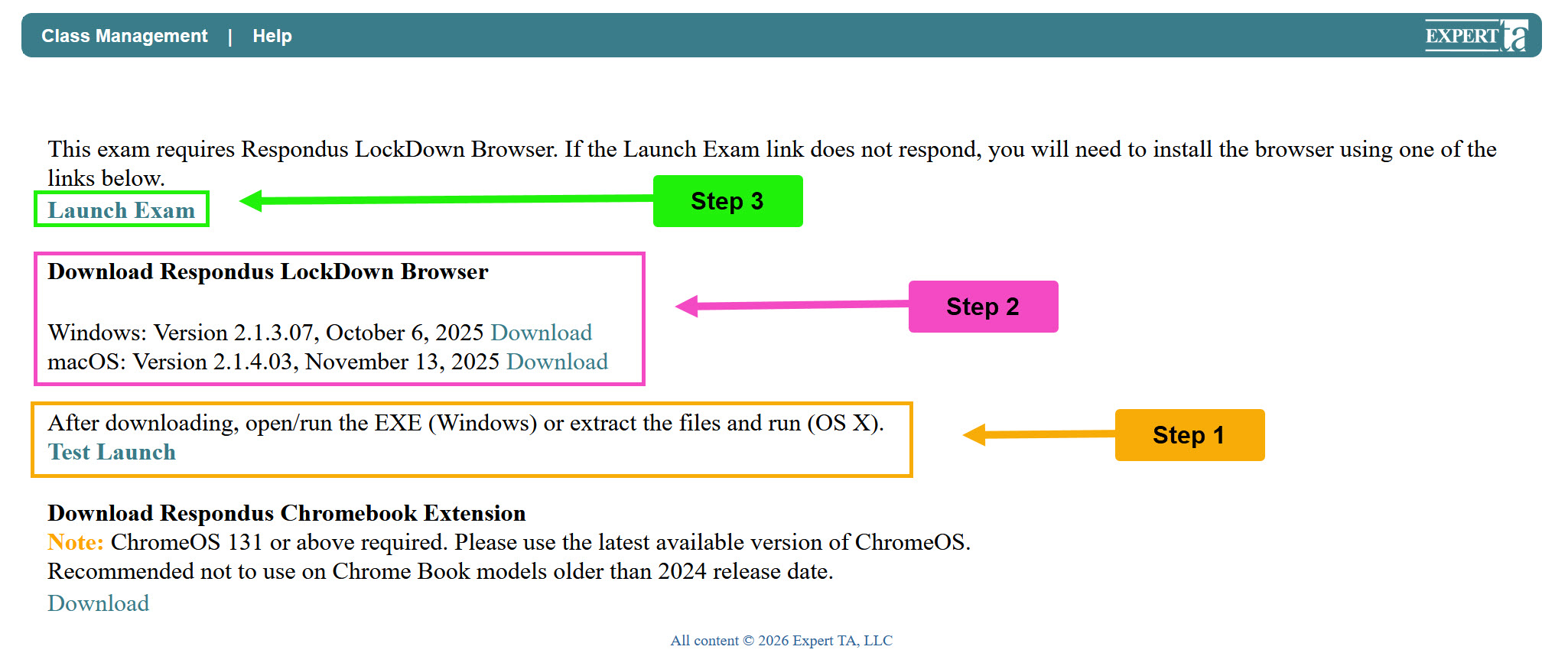
Getting Started
- Check Your Installation
If you already have Respondus LockDown Browser installed, click Test Launch.- This will verify that your version meets the minimum requirements and is working properly
- Download and Install (if needed)
If the Test Launch identifies that your version is outdated or if you do not have Respondus LockDown Browser installed:- Use the download link on the page
- Install the correct version for your operating system
- Run Test Launch again to confirm it works
- Launch Your Assignment
Once Test Launch is successful, click Launch Exam to begin your assignment
Chromebook Users
Respondus LockDown Browser is supported on Chromebooks with the following requirements:
- Must be running ChromeOS 131 or higher
- Older Chromebook models (released before 2024) may not support this version
To use Respondus on a Chromebook:
- Install the Respondus LockDown Browser extension using the link provided on the page
- Run Test Launch to confirm it is working before starting your assignment
Access Limits
Your instructor may limit how many times you can access the assignment.
If you exceed the allowed number of attempts, you will see a message indicating that you can no longer access the assignment.
- To regain access, you must contact your instructor
Tips
- Always run Test Launch before starting your assignment
- Do not wait until the last minute to test your setup
Was this article helpful?
That’s Great!
Thank you for your feedback
Sorry! We couldn't be helpful
Thank you for your feedback
Feedback sent
We appreciate your effort and will try to fix the article